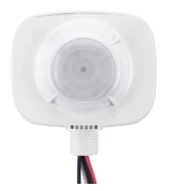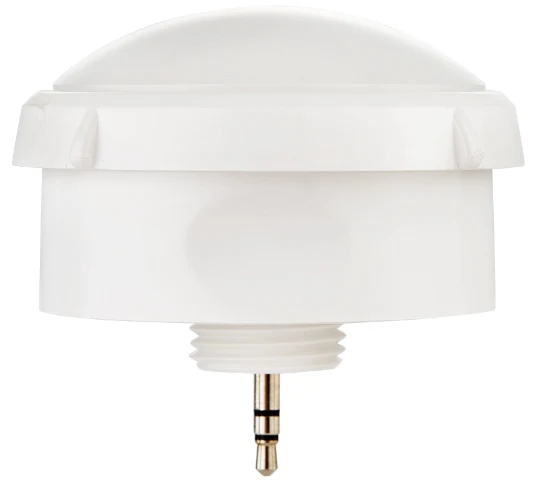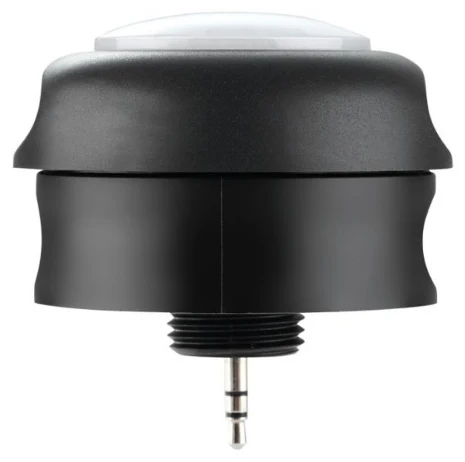
If an occupancy sensor in a warehouse or industrial hall does not respond, the cause is usually a sensor not designed for the mounting height, a wrong or missing lens, a position from which racking blocks the view of the aisles, or settings such as a brightness threshold that is too high. Office presence detectors are built for a few metres of height; from around 6 m you need high bay sensors with a focusing lens and adapted signal evaluation. This guide helps you narrow down the cause systematically and shows which sensors are intended for which height according to their data sheets.
Why great heights push sensors to their limits
A PIR sensor detects thermal radiation moving through the zones of its lens. At 3 m, a person fills a large part of a zone; at 10 m, only a small part. The signal becomes weaker and small movements get lost. High bay sensors solve this with lenses that focus the field of view more strongly and with evaluation algorithms designed for great heights. The sensors in the Keilton+autani range use the AlgoH2 algorithm, which according to the manufacturer improves detection at height and reduces false triggers.
The most common causes
Mounting height and sensor type do not match
The classic case: a hall with an 8 m ceiling has a presence detector designed for offices. At best it detects forklifts and fast movements, but not a person standing at a packing table. So first compare the actual mounting height with the data sheet.
| Sensor | Mounting height per data sheet | Supply | Note |
|---|---|---|---|
| IFS105SE | up to approx. 5.5 m | 12 V via driver AUX | luminaire sensor, low halls and ancillary rooms |
| MWS105E | 2.4 to 6 m | 12 V via FA102 | microwave, concealed installation in the luminaire |
| EFS106 | 6 to 12 m | 12 V via driver AUX | high bay, IP40 |
| EFS106W | 6 to 12 m | 12 V via driver AUX | high bay, IP66, photocell instead of daylight control |
| EFS104 | 6 to 15 m | own power supply, 120–277 V AC | relay up to 6 A plus 0-10 V dimming, lens separate |
Wrong or missing lens
With high bay sensors, the lens determines how large the detection area on the floor is and how sensitive the sensor is there. According to the data sheet, the lens for the EFS104 is required and must be ordered separately: the HBL1-2 covers an area of around 24 m in diameter at 12 m height, the HBL3-2 around 30 m at 15 m. The WHBL1 lens is intended for the EFS106W. A lens for lower heights installed at a great height produces a large but insufficiently sensitive field. Always plan using the detection diagrams in the manufacturer's documentation.
Racking aisles and shadowing
In racked warehouses, line of sight is the main issue. A sensor mounted above a rack rather than above the aisle looks at the top of the goods. Anyone picking in the aisle remains invisible. Crane runways, ventilation ducts, suspended elements and tall machines also cast "shadows" in the detection field.
- Position sensors centrally above the aisle.
- Check whether racks have become taller or denser since the original planning.
- Provide several sensors with overlapping fields for long aisles and link them into one zone.
More on grid planning in High bay sensors for warehouses.
Direction of movement
PIR sensors respond best to movement across their zones. Someone walking directly towards or away from a sensor in an aisle produces a weaker signal than someone crossing the aisle. That is another argument for sensors centrally above the aisle and overlapping fields along the walking direction.
Heat sources and temperature
A PIR sensor detects the temperature difference between a person and the surroundings. The smaller this difference, the weaker the signal – for example in very warm areas of a hall in summer or under the roof, where warm air collects. Warm air heaters, radiant heaters, ovens or hot machines, on the other hand, generate heat signals of their own that can cause false triggers. Align detection so that such sources lie outside the field. According to the manufacturer, the operating temperature range of the high bay sensors is −30 °C to 55 °C.
Daylight: the sensor will not switch on
Sensors with light measurement do not switch the artificial light on when they measure enough brightness. Under rooflights or next to open doors, this can mean that the lights stay off when someone enters the hall. If it really is too dark on the floor, the sensor sits in a spot that is too bright or the threshold is set incorrectly. Note that, according to its data sheet, the EFS106W has a photocell for hold ON/OFF operation but no daylight control.
Power supply, driver and commissioning
If a sensor does not respond at all, detection is sometimes not to blame:
- No supply: according to their data sheets, the EFS106 and EFS106W are powered via the 12 V AUX output of a dim-to-off LED driver. If the driver has no such output, the sensor stays silent. For high bay luminaires without 12 V AUX, the EFS104 with its own power supply is the right route.
- Not in the right group: the sensor detects, but controls a different zone. The app shows this.
- Not commissioned: according to the data sheet, commissioning is done via the Keilton+autani app after a reset.
A systematic approach
- Measure the mounting height and compare it with the data sheet.
- Check the lens: present, suitable for the height, correctly fitted.
- Check the line of sight: does the sensor look into the aisle or at obstacles?
- Check the settings: brightness threshold, sensitivity, time delay, group assignment.
- Test with a person in work clothing moving as they do in everyday work – not just by waving.
What well-planned hall lighting control delivers
Halls have high connected loads, long operating hours and large areas that are only used intermittently. Once detection works reliably, there is a lot to save: as a guide value from our projects, sensors alone save more than 60 %, and the savings potential is up to 92 %. With background lighting in neighbouring zones, the hall still remains easy to navigate. For a preselection of suitable sensors, use the sensor finder.
How we can help
Our focus is retrofitting: we turn existing LED luminaires with dimmable 0-10 V or DALI drivers into smart lighting using sensors and app-based lighting management – without new luminaires and without new control cables. Details under Retrofit.
We survey your hall on site, check mounting heights, racking geometry and drivers, and select sensor and lens according to the data sheets – the EFS104 where there is no 12 V AUX. Installation is usually carried out by us, or by your own electrical contractor if you prefer. Every project includes the AU-Manager, so occupancy detection, zoning and monitoring are included. Get in touch via our contact page.
Try it interactively
Sensor finder
Frequently asked questions
Why is the motion sensor in my warehouse not working?
Often the sensor is not designed for the mounting height, the lens is unsuitable or missing, racks block the view, or the brightness threshold prevents switching on. A missing supply from the driver can also be the cause.
Up to what height does an occupancy sensor work?
That depends on the device. According to the data sheets, luminaire sensors such as the IFS105SE are designed for up to approx. 5.5 m, the EFS106 and EFS106W high bay sensors for 6 to 12 m and the EFS104 with a suitable lens for 6 to 15 m.
Which lens do I need for a 12 m ceiling?
For the EFS104, the data sheet lists the HBL1-2 lens with a detection diameter of around 24 m at 12 m height and the HBL3-2 with around 30 m at 15 m. The manufacturer's detection diagram is what counts.
Where should the sensor be mounted in a high-rack warehouse?
Centrally above the aisle, so it looks into the aisle rather than onto the tops of the racks. Long aisles get several sensors with overlapping fields, linked into one zone.
What if the high bay luminaire has no 12 V AUX output?
Then the EFS106 cannot be powered. The EFS104 has its own power supply for 120–277 V AC, switches via a relay and dims via 0-10 V, making it the route for luminaires without an AUX output.